I. Overview
This website/software integrates JSME and RDKit into one workflow:
- Draw molecular bond-line structures in the JSME editor.
- Enter SMILES manually in the input box.
- Query known compounds (for example, from PubChem) and display compound name and basic properties.
- Generate RDKit 2D depiction and 3D ball-and-stick model.
- Enumerate multiple 3D conformers (if available) for the same molecule.
- Visualize stereocenters (chiral carbon atoms) for easier stereochemistry interpretation.
II. JSME Molecular Editor Introduction
JSME (JavaScript Molecule Editor) is a lightweight web-based molecular structure editor used for drawing atoms,
bonds, rings, and common functional fragments. In this project, JSME is used as the molecular input front end.
JSME attribution (original text):
JSME Molecular Editor v2024-04-29
Peter Ertl and Bruno Bienfait
Copyright (c) 2024, Novartis Institutes for BioMedical Research Inc. and Bruno Bienfait.
All rights reserved.
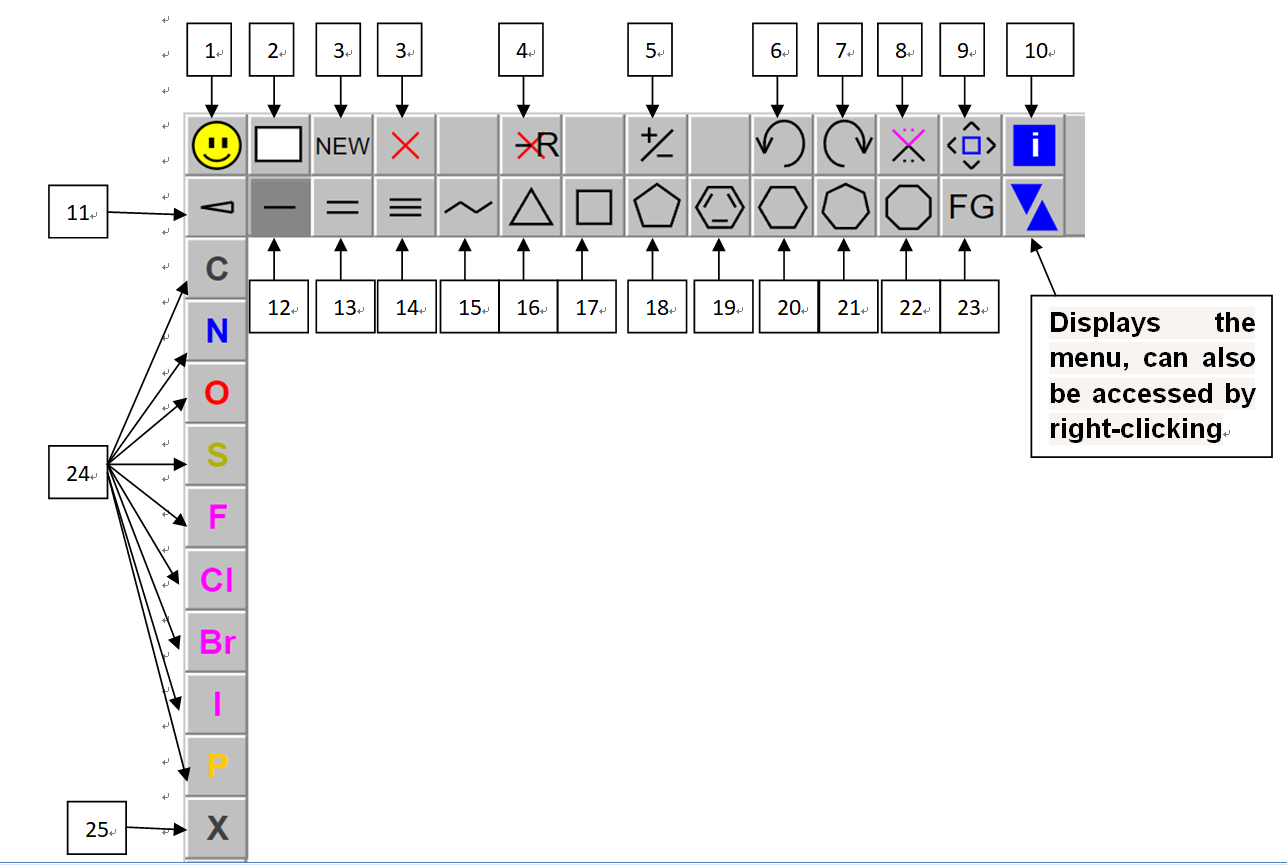
III. Interface and Toolbar Guide (Figure 1)
Figure 1 labels the JSME drawing area and toolbar items. The numbered annotations (1-25) correspond to buttons
commonly used in structure drawing.
A. Frequently used core tools
- 4: Delete mode (click atoms/bonds to remove).
- 6 / 7: Undo / Redo.
- 11: Stereo bond tools (solid wedge / hashed wedge / wavy bond).
- 12 / 13 / 14: Single / Double / Triple bond.
- 15: Fast continuous bond drawing.
- 16-22: Ring shortcuts (3-membered to 8-membered, including benzene).
- 24 / 25: Common atom list and custom bracket atom input.
B. Less frequently used controls
- 1: Show current SMILES in the drawing panel.
- 2 / 3: Clear drawing / start a new disconnected component.
- 5: Toggle allowed charge state on selected atom.
- 8: Spiro ring option for next ring placement.
- 9: Move selected atoms for layout adjustment.
- 10: Version/help information.
- 23: Functional group menu (also available by right-click).
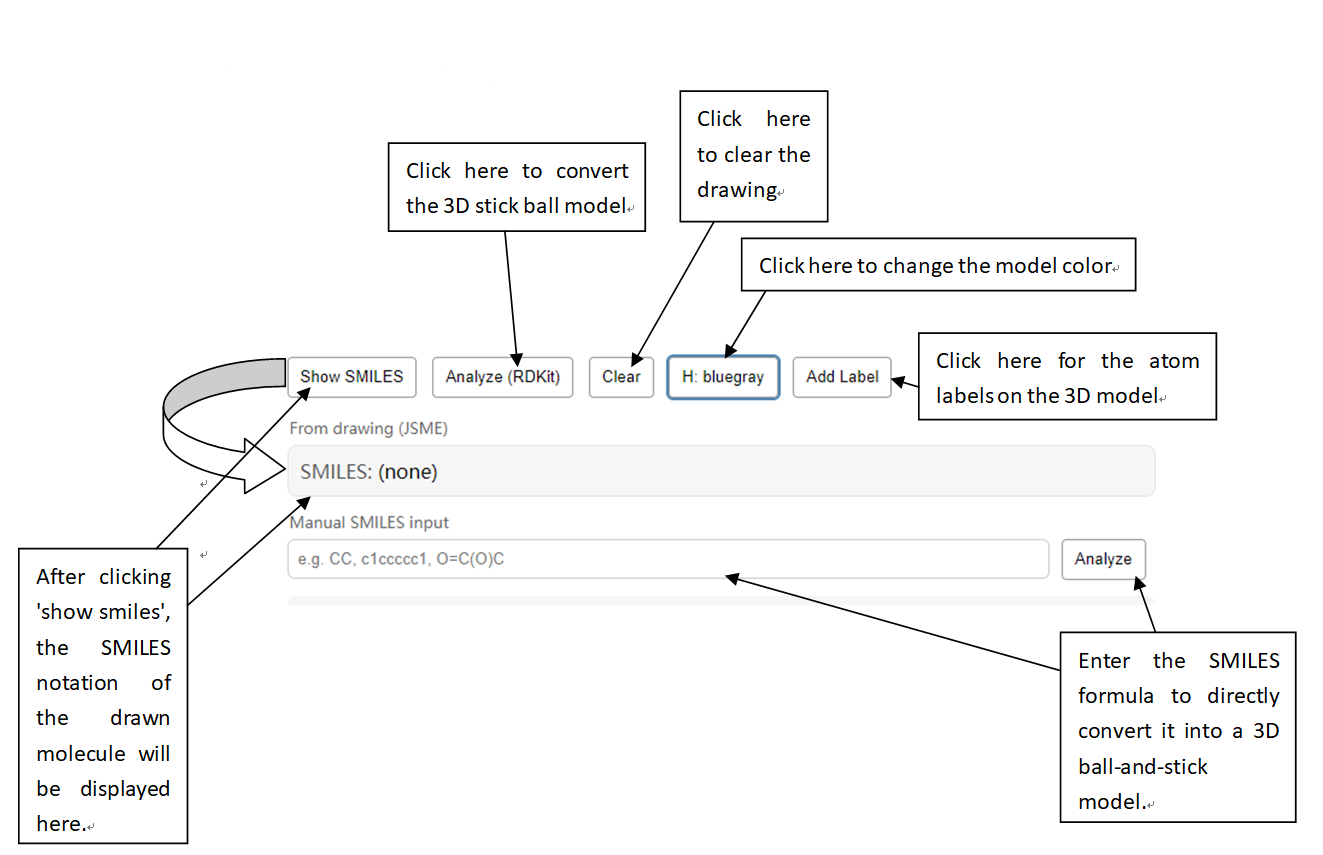
IV. Conversion Area and Main Workflow (Figure 2)
Figure 2 shows the lower operation area where drawing input, manual SMILES input, and RDKit analysis are connected.
Recommended workflow
- Input molecule by either drawing in JSME or typing a SMILES string manually.
-
If you draw first, click Show SMILES to get the generated SMILES text.
-
Click Analyze (RDKit) (or the Analyze button next to Manual SMILES input) to process the molecule.
- Review returned compound information (name/status/formula/exact mass when available).
- Compare the RDKit 2D depiction with the 3D ball-and-stick model.
-
Use conformer navigation (for molecules with multiple conformers) to compare 3D geometries.
-
Click Add Label to show atom indices and inspect stereocenters more clearly.
V. Notes on Stereochemistry and Conformers
-
Configuration (chirality) and conformation are different: chirality concerns stereocenter assignment;
conformers are different 3D shapes mainly caused by bond rotation.
-
For chiral molecules, check consistency across SMILES stereo marks, 2D wedge/hash depiction, and 3D labeled model.
-
The tool is intended to make this cross-check straightforward for learning and for practical structure validation.
VI. Quick Reference
Input (JSME draw / Manual SMILES) -> Analyze -> Name & properties -> 2D depiction -> 3D model -> Conformer check -> Stereocenter labeling